Quick and Simple Way to Run Factorial Experiments
Table of Contents

This guide demonstrates how to set up and run factorial experiments using apsimNGpy.
Factorial experiments involve systematically varying multiple factors to observe their effects on outputs such as crop yield.
The ExperimentManager: in apsimNGpy provides a high-level interface to build factorial experiments
programmatically without APSIM GUI or template.
Why apsimNGpy for factorial experiments
Data in apsimNGpy is lazily loaded, allowing users and researchers to run large factorial experiments workflows without excessive memory usage. Simulation outputs are also readily available for downstream analysis.
Quick Overview
The create_experiment_from_models workflow provides a streamlined way to build APSIM experiments directly from one or more ApsimModel instances. It allows you to:
Use existing ApsimModel instances as the basis for an experiment Define and add multiple experimental factors, such as fertilizer rate or sowing density Generate factor combinations or treatment permutations Create and configure the corresponding APSIM experiment simulations Export the resulting experiment to an .apsimx file Return an ApsimModel instance that can be further inspected, edited, run, and visualized
Note: This workflow replaces the deprecated ExperimentManager class, which will be removed in a future release.
Required API
from apsimNGpy.core.experiment import create_experiment_from_models
from apsimNGpy.core.experiment_tools import factor_spec
experiment = create_experiment_from_models(
         model="Maize",# This loads default maize model, but you can replace it with an .apsimx file path
         specifications=factor_spec(
             "Maize",
             param_node_location="Sow using a variable rule",
             node_type="Manager",
             param_identifier="Population",
             values=[6, 10, 14],
             rename="population",
         ),
     )
experiment.run()
df = experiment.results
Configuring Factors
Multiple factors can be specified using a dictionary. Each dictionary key represents the factor name, and the corresponding value defines the parameter-path specification. See the examples below
experiment = create_experiment_from_models('Maize',
                                        specifications={
                                            'ftype': "[Fertilise at sowing].Script.FertiliserType= DAP,NO3N",
                                            'Amount': "[Fertilise at sowing].Script.Amount= 0, 300",
                                        }
Note
Using a dictionary is simple and convenient, but it can also make it easy to introduce invalid configurations without realizing it.
The factor_spec method helps avoid this by allowing you to explicitly specify the model, node name or parameter path, and the corresponding values.
Under the hood, Pydantic models together with ApsimModel are used to validate the supplied arguments and ensure that the specification is correctly structured.
As specification is a dict, we can start with an empty dict and add one factor at a time as follows
specifications = {}

specifications.update(
    factor_spec(
        "Maize",
        param_node_location="Organic",
        node_type="Organic",
        param_identifier="Carbon[1]",
        values=[0.45, 1, 3],
        rename="initial_carbon",
    )
)

specifications.update(
    factor_spec(
        "Maize",
        param_node_location="Sow using a variable rule",
        node_type="Manager",
        param_identifier="Population",
        values=[6, 10, 14],
        rename="population",
    )
)
Pass the specifications to create_experiment_from_models()
experiment = create_experiment_from_models(
    model="Maize",
    specifications=specifications,
    permutation=True,
)
experiment.run()
results = experiment.results
Ideally, an experiment can be initialized from an APSIM file path or one of the bundled example models. However, you can also create an experiment directly from an existing ApsimModel instance.
from apsimNGpy.core.apsim import ApsimModel
with ApsimModel('Maize') as model
    model.edit_model('Models.Surface.SurfaceOrganicMatter','SurfaceOrganicMatter', InitialCNR=100)
    experiment = create_experiment_from_models(
       model=model,
       specifications=specifications,
       permutation=True,
       base_simulation=0, # can be and index or string name of the simulation
   )
   experiment.run()
   results = experiment.results
Creating Experiments from a File
In addition to defining factors directly in Python with
create_experiment_from_models, apsimNGpy can construct an APSIM
experiment from an existing CSV or Excel file using
create_experiment_from_file.
This workflow is particularly useful when treatment combinations have already been generated externally, for example from:
a sensitivity-analysis sampling design,
a calibration parameter set,
a field-experiment treatment table,
a Latin hypercube or other sampling procedure, or
a custom experimental design generated with pandas, NumPy, or another package.
Unlike create_experiment_from_models, where factor levels can be crossed
programmatically, create_experiment_from_file treats each row of the input
file as a complete treatment. The values in that row are applied together when
the corresponding APSIM simulation is created.
Step 1. Import the API
Import create_experiment_from_file from the experiment module:
from apsimNGpy.core.experiment import create_experiment_from_file
Step 2. Prepare the treatment file
The input file can be either a CSV file or an Excel workbook. Each parameter column should be named using a valid APSIM parameter path, while one additional column is used to uniquely identify each treatment.
For example, the following table varies plant population and nitrogen fertilizer rate:
Treatment |
[Sow using a variable rule].Script.Population |
[Fertilise at sowing].Script.Amount |
|---|---|---|
P6_N0 |
6 |
0 |
P6_N100 |
6 |
100 |
P10_N0 |
10 |
0 |
P10_N100 |
10 |
100 |
P14_N0 |
14 |
0 |
P14_N100 |
14 |
100 |
The same table can be created with pandas:
import pandas as pd
factors = pd.DataFrame(
    {
        "Treatment": [
            "P6_N0",
            "P6_N100",
            "P10_N0",
            "P10_N100",
            "P14_N0",
            "P14_N100",
        ],
        "[Sow using a variable rule].Script.Population": [
            6, 6, 10, 10, 14, 14
        ],
        "[Fertilise at sowing].Script.Amount": [
            0, 100, 0, 100, 0, 100
        ],
    }
)

factors.to_csv(
    "factorial_design.csv",
    index=False,
)
Note
Each row represents one treatment. create_experiment_from_file does
not generate additional permutations of the supplied rows. Therefore,
all desired treatment combinations should already be present in the
input file.
Step 3. Create the experiment
Pass the APSIM model and treatment file to
create_experiment_from_file:
experiment = create_experiment_from_file(
    model="Maize",
    experiment_from_file="factorial_design.csv",
    name_column="Treatment",
    experiment_name="PopulationNitrogenExperiment",
)
model can be an APSIM model file, a model supported by ApsimModel, or
an existing ApsimModel instance.
The name_column argument identifies the column whose values are used to
distinguish the treatments generated from the file.
Selecting the base simulation
If the source model contains multiple simulations, the simulation used as the experiment template can be selected by its index:
experiment = create_experiment_from_file(
    model="my_model.apsimx",
    experiment_from_file="factorial_design.csv",
    name_column="Treatment",
    base_simulation=0,
)
or by simulation name:
experiment = create_experiment_from_file(
    model="my_model.apsimx",
    experiment_from_file="factorial_design.csv",
    name_column="Treatment",
    base_simulation="Simulation",
)
Step 4. Run the experiment
The returned object is an ApsimModel instance, so the experiment can be
run using the normal ApsimModel workflow:
experiment.run()
results = experiment.results
print(results.head())
Because an ApsimModel instance is returned, all regular model inspection,
editing, visualization, and simulation-management methods remain available.
For example:
experiment.tree()

experiment.run()

df = experiment.results
Creating the factor table with apsimNGpy
apsimNGpy also provides create_factor_table for conveniently building
a row-based factor table.
from apsimNGpy.core.sim_tools import create_factor_table

factors = create_factor_table(
    name_column="Treatment",
    **{
        "[Maize].Leaf.Photosynthesis.RUE.FixedValue": [
            1.2, 1.4, 1.6
        ],
        "[Sow using a variable rule].Script.Population": [
            6, 10, 14
        ],
    },
)

factors.to_csv(
    "factorial_design.csv",
    index=False,
)

experiment = create_experiment_from_file(
    model="Maize",
    experiment_from_file="factorial_design.csv",
    name_column="Treatment",
)

experiment.run()

results = experiment.results
create_factor_table automatically creates the treatment identifier column.
All parameter-value sequences should describe the intended row-wise treatment
combinations.
Using an Excel file
Excel files are also supported. When an Excel workbook is supplied, the
worksheet containing the experimental design must be specified with
sheet:
experiment = create_experiment_from_file(
    model="Maize",
    experiment_from_file="factorial_design.xlsx",
    name_column="Treatment",
    sheet="Treatments",
    experiment_name="PopulationNitrogenExperiment",
)

experiment.run()
For CSV files, sheet is not required.
When should create_experiment_from_file be used?
Use create_experiment_from_file when the experimental design already
exists as a table and each row represents a complete treatment.
For example:
Treatment  Population  Nitrogen
--------------------------------
T1         6           0
T2         6           100
T3         10          0
T4         10          100
Use create_experiment_from_models when the experimental factors are being
defined directly from Python and apsimNGpy should construct the treatment
combinations for you.
Conceptually, the two workflows differ as follows:
create_experiment_from_models

    factor definitions
           |
           v
    apsimNGpy generates
    treatment combinations
           |
           v
    APSIM Experiment


create_experiment_from_file

    predefined treatment table
    row 1 --> treatment 1
    row 2 --> treatment 2
    row 3 --> treatment 3
           |
           v
    APSIM FactorFromFile Experiment
Note
create_experiment_from_file relies on APSIM’s
FactorFromFile functionality. An APSIM version that supports
Models.Factorial.FactorFromFile is therefore required.
Visualization and other analysis
The returned ApsimModel instance provides access to all methods and attributes available on ApsimModel objects, including tools for model visualization, inspection, editing, and simulation management.
exp.cat_plot(x='Population', y='Yield', hue='Nitrogen', table='Report', kind='box',)
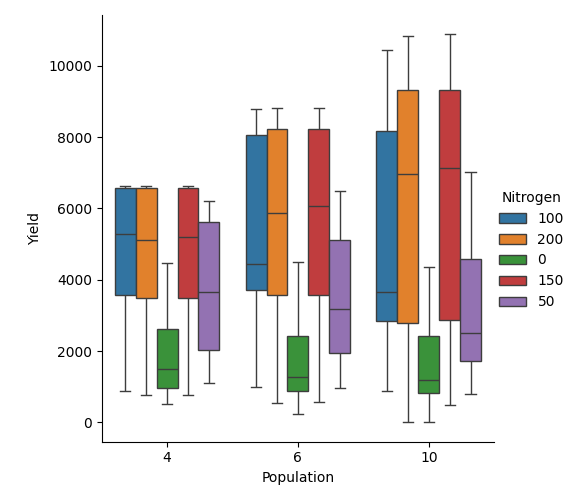
What is is the mean of maize grain yield if grouped by population density?
df  = exp.results
df.groupby('Population')['Yield'].mean()
Out[6]:
Population
10    4489.068667
4     4009.747575
6     4385.225238
Name: Yield, dtype: float64
What about by Nitrogen fertilizers?
df.sort_values(by='Nitrogen', inplace=True)
df.groupby('Nitrogen')['Yield'].mean()
Out[17]:
Nitrogen
0      1759.903894
100    5145.991310
150    5580.979357
200    5523.046246
50     3463.481660
Name: Yield, dtype: float64
From the mean values obtained in both code examples, it is evident that nitrogen fertilizer has a greater influence on corn grain yield than plant population density, as reflected by the higher mean yield values, especially at high nitrogen rates.
Hint
To conduct a factorial experiment involving cultivar modifications, a crop replacement must be added.
use add_crop_replacements method before running
Note
This workflow replaces the ExperimentManager class, which is deprecated and will be removed in a future release.
Further Reading
For advanced usage (e.g., linked script validation, mixed designs), refer to the API reference section.