Quick and Simple Way to Run Factorial Experiments
Table of Contents

This guide demonstrates how to set up and run factorial experiments using apsimNGpy.
Factorial experiments involve systematically varying multiple factors to observe their effects on outputs such as crop yield.
The ExperimentManager: in apsimNGpy provides a high-level interface to build factorial experiments
programmatically without APSIM GUI or template.
Why apsimNGpy for factorial experiments
Data in apsimNGpy is lazily loaded, allowing users and researchers to run large factorial experiments workflows without excessive memory usage. Simulation outputs are also readily available for downstream analysis.
Quick Overview
The ExperimentManager: class wraps an existing APSIM model and allows you to:
Clone and isolate a base simulation
Add multiple input factors (e.g., fertilizer rate, sowing density)
Generate permutations or combinations of those factors
Export the updated
.apsimxfile with fully configured experimentsvisualize outputs easily
Step 1. Import the API and initialize it
from apsimNGpy.core.experiment import ExperimentManager
exp = ExperimentManager("Maize", out_path="Maize_experiment.apsimx")
Step 2. Adding Factors
The following example demonstrates how plant population density and nitrogen fertilizer rates are added with one at a time.
Add nitrogen levels as a continuous factor:
exp.add_factor(specification="[Fertilise at sowing].Script.Amount = 0 to 200 step 50", factor_name='Nitrogen')
Add population density as a categorical factor:
exp.add_factor(specification="[Sow using a variable rule].Script.Population =  4, 6, 10"",
                 factor_name='Population')
Step 3. Running the Experiment
Execute the simulation and visualize results:
exp.run(report_name='Report')
df = apsim.results
df[['population']] = pd.Categorical(['Population'])
Step 4. Visualization and other analysis
a) Visualization
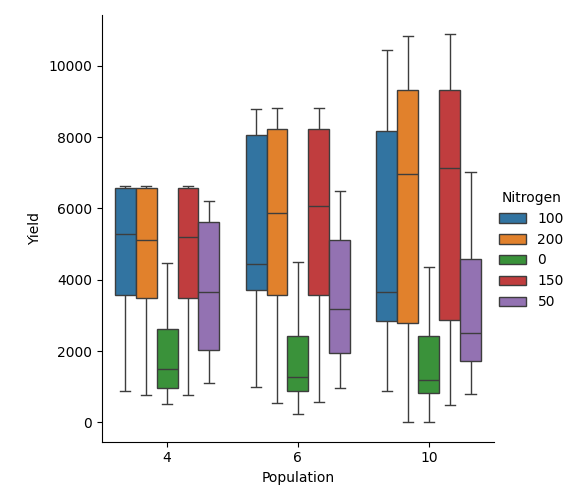
exp.cat_plot(x='Population', y='Yield', hue='Nitrogen', table='Report', kind='box',)
b) Statistical analysis
What is is the mean of maize grain yield if grouped by population density?
df  = exp.results
df.groupby('Population')['Yield'].mean()
Out[6]:
Population
10    4489.068667
4     4009.747575
6     4385.225238
Name: Yield, dtype: float64
What about by Nitrogen fertilizers?
df.sort_values(by='Nitrogen', inplace=True)
df.groupby('Nitrogen')['Yield'].mean()
Out[17]:
Nitrogen
0      1759.903894
100    5145.991310
150    5580.979357
200    5523.046246
50     3463.481660
Name: Yield, dtype: float64
From the mean values obtained in both code examples, it is evident that nitrogen fertilizer has a greater influence on corn grain yield than plant population density, as reflected by the higher mean yield values, especially at high nitrogen rates.
Factorial Experiment with Cultivar Replacements
Hint
To conduct a factorial experiment involving cultivar modifications, a crop replacement must be added.
Load the maize simulations again and initialize APSIM:
from apsimNGpy.core.experiment import ExperimentManager
exp = ExperimentManager("Maize", out_path="Maize_experiment.apsimx")
Create an experiment with permutation enabled:
exp.init_experiment(permutation=True)
Add nitrogen and population density factors:
exp.add_factor(specification="[Fertilise at sowing].Script.Amount = 0 to 200 step 20",
factor_name='Nitrogen')
exp.add_factor(specification="[Sow using a variable rule].Script.Population = 4, 10, 2, 7, 6",
                  factor_name='Population')
Replace the crop with an alternative maize cultivar:
exp.add_crop_replacements(_crop='Maize')
Add a factor for radiation use efficiency (RUE):
exp.add_factor(specification='[Maize].Leaf.Photosynthesis.RUE.FixedValue = 1.0, 1.23, 4.3',
factor_name='RUE')
API Summary
ExperimentManager: Main entry point to create and manipulate factorial designs.init_experiment(): Prepares the experiment node structure in the model.add_factor(): Adds a new varying parameter or script-defined rule.finalize(): Validates and commits the experiment structure to the model.
Further Reading
For advanced usage (e.g., linked script validation, mixed designs), refer to the API reference section.